How to Check Google Rankings and AI Overviews via API in 2026
Tracking your Google rank by hand is a pain. You spin up scrapers, rotate proxies to avoid getting blocked, and then write parsers for HTML that Google reshuffles every few weeks. The moment your code works, the markup changes and you are back to fixing selectors.
The AI Overview made this harder. It now sits above the organic results for a lot of queries, and it changes who actually gets the click. Ranking #2 means something different when there is a summary box eating the top of the page.
Trackee returns both in one call. You send a keyword and a domain, and you get back the organic position, the ranking URL, and whether that domain shows up in the AI Overview and is cited in it. No scrapers, no proxies, no parsing.
Want to see it before you write any code? Run a keyword through the free AI Overview checker in your browser and watch what comes back.
What you need
You need three things to follow along:
- A free Trackee account. The free plan is enough to test every request in this post.
- An access key from your dashboard.
- The
x-access-keyheader on every request.
That is the whole setup. No SDK to install, no OAuth dance.
Step 1: Get your API key
Sign in to your Trackee dashboard and open the API keys section. Create a key and copy it somewhere safe, since the full value is only shown once.
Every request to the API carries this key in the x-access-key header. If you ship code that hits Trackee from a server, keep the key in an environment variable and never commit it. Treat it like a password, because it spends your credits.
Step 2: Check a keyword
Here is the core call. You POST a keyword and a domain to /v1/rank, and Trackee tells you where that domain sits for that keyword.
curl -X POST https://api.trackee.dev/v1/rank \
  -H "x-access-key: YOUR_API_KEY" \
  -H "Content-Type: application/json" \
  -d '{ "keyword": "best crm software", "domain": "salesforce.com" }'
If you would rather not touch curl yet, you can build the same request point and click in the API playground.
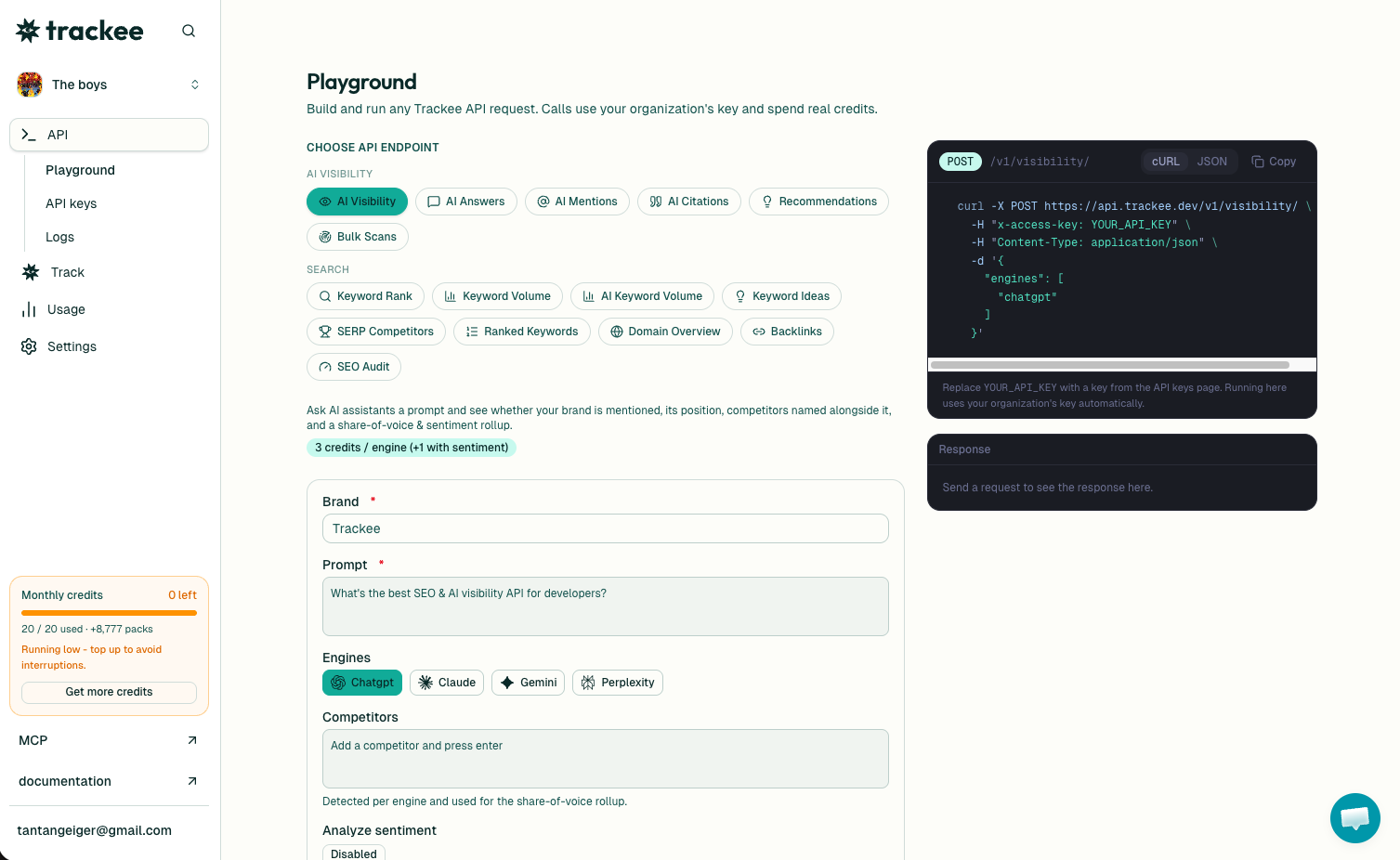
The response comes back as JSON:
{
  "success": true,
  "credits": { "charged": 1, "remaining": 4999 },
  "data": {
    "keyword": "best crm software",
    "domain": "salesforce.com",
    "position": 2,
    "url": "https://www.salesforce.com/crm/what-is-crm/software/",
    "ai_overview": { "present": true, "cited": true }
  }
}
Here is what each field means:
positionis the organic rank for the domain, so2means it is the second organic result. This ignores ads.urlis the exact page that ranks. Useful when you want to know which URL Google picked, not just that you rank.ai_overview.presenttells you whether Google showed an AI Overview for this keyword at all.ai_overview.citedtells you whether your domain is one of the sources Google linked inside that AI Overview.
Each keyword you check costs 1 credit. The credits object in the response shows what you were charged and what is left, so you can watch your balance without a separate call.
One request, and you know your rank AND your AI Overview status. That is the whole point.
Why the AI Overview matters
The AI Overview is the summary box Google now shows at the top of many results. It answers the question directly, with a handful of cited sources, before the user ever scrolls to the blue links.
When it shows up, it pushes the organic results down the page. You can rank #1 and still lose the click, because the answer was already on screen and the person never scrolled. That is why position alone is not the full story anymore.
Being cited in the AI Overview is the new front page. If Google pulls your page in as a source, you get a link in the box that everyone reads first. That is what ai_overview.cited: true is telling you, and it is worth tracking as its own metric next to your rank.
So watch both. A keyword where you rank #3 but get cited in the AI Overview can send more traffic than a #1 with no citation. If you are still deciding which keywords to track in the first place, the Keyword Research API can hand you the terms and volumes to build your list from.
Check mobile and other locations
Rankings differ by device and by location. What sits at #2 on desktop in the US can look different on a phone or in another country, and the AI Overview shows up on some devices and not others.
You can pass a device of "desktop" or "mobile", and a location to check a specific market:
curl -X POST https://api.trackee.dev/v1/rank \
  -H "x-access-key: YOUR_API_KEY" \
  -H "Content-Type: application/json" \
  -d '{ "keyword": "best crm software", "domain": "salesforce.com", "device": "mobile", "location": "United States" }'
The response has the same shape. Now you are seeing the mobile result set, which is what most of your visitors actually get. If you skip these fields, Trackee defaults to a sensible desktop check, so you only add them when you need a specific view.
Run the same keyword across desktop and mobile and you will often see the AI Overview flip between present: true and present: false. That difference is real, and it is the kind of thing a hand-rolled scraper usually misses.
When a domain is not ranking
Not every domain ranks for every keyword, and that is fine. When the domain does not appear in the results, position and url come back as null:
{
  "success": true,
  "credits": { "charged": 1, "remaining": 4998 },
  "data": {
    "keyword": "best crm software",
    "domain": "some-tiny-blog.com",
    "position": null,
    "url": null,
    "ai_overview": { "present": true, "cited": false }
  }
}
There is no special error to handle here. The call still returns success: true, you still get charged 1 credit, and ai_overview still reports what it saw. A null position just means "not found in the results we checked."
So in your code you check whether position is null and treat that as "not ranking," instead of wrapping the whole thing in error handling. It keeps the logic simple: one branch for a number, one branch for null.
What's next
You now have everything to check a rank and an AI Overview from one endpoint. From here you can loop over a keyword list, store the numbers over time, and watch both your organic position and your AI Overview citations move.
A few links to keep going:
- The Rank Tracking API page has the full field reference and more examples.
- The API reference covers every endpoint, parameter, and response shape.
- The free plan gives you credits to test all of this before you commit to anything.
- If you work with an AI agent, the Trackee MCP server lets it pull rank and AI Overview data for you in plain language, no curl required.
Grab a key, run the curl from Step 2 against one of your own keywords, and see where you actually stand.